
Best Recurring Workflow and Checklist Software for Operations Teams in 2026
July 16, 2026
Recurring operational work usually breaks down between tools, not inside one task. The SOP may live in a document, the reminder may live in someone’s calendar, the update may happen in Slack, and the proof of completion may be buried in email.
Recurring workflow and checklist software exists to close that gap. The best tools do more than document the process. They schedule the work, assign accountability for each run, track checkpoints, and create a record that the work was completed.
This guide compares the best recurring workflow and checklist software for operations teams in 2026, with a focus on scheduling, accountability, approvals, audit trails, and recurring process execution.
What is recurring workflow and checklist software?
Recurring workflow and checklist software helps teams run repeatable work on a schedule. Instead of relying on a static SOP, spreadsheet, or project board, these tools create a new workflow run each time the process needs to happen, assign steps to the right people, send reminders, and keep a completion history.
That distinction matters. A project management tool helps teams coordinate work toward a goal or deadline. An SOP tool helps teams document how work should be done. Recurring workflow software helps teams make sure the work actually happens every time the process is due.
For operations teams, the most important buying question is not “Which tool has the most features?” It is “Which tool makes repeatable work assigned, visible, trackable, and provable?”
Quick answer: best recurring workflow and checklist software
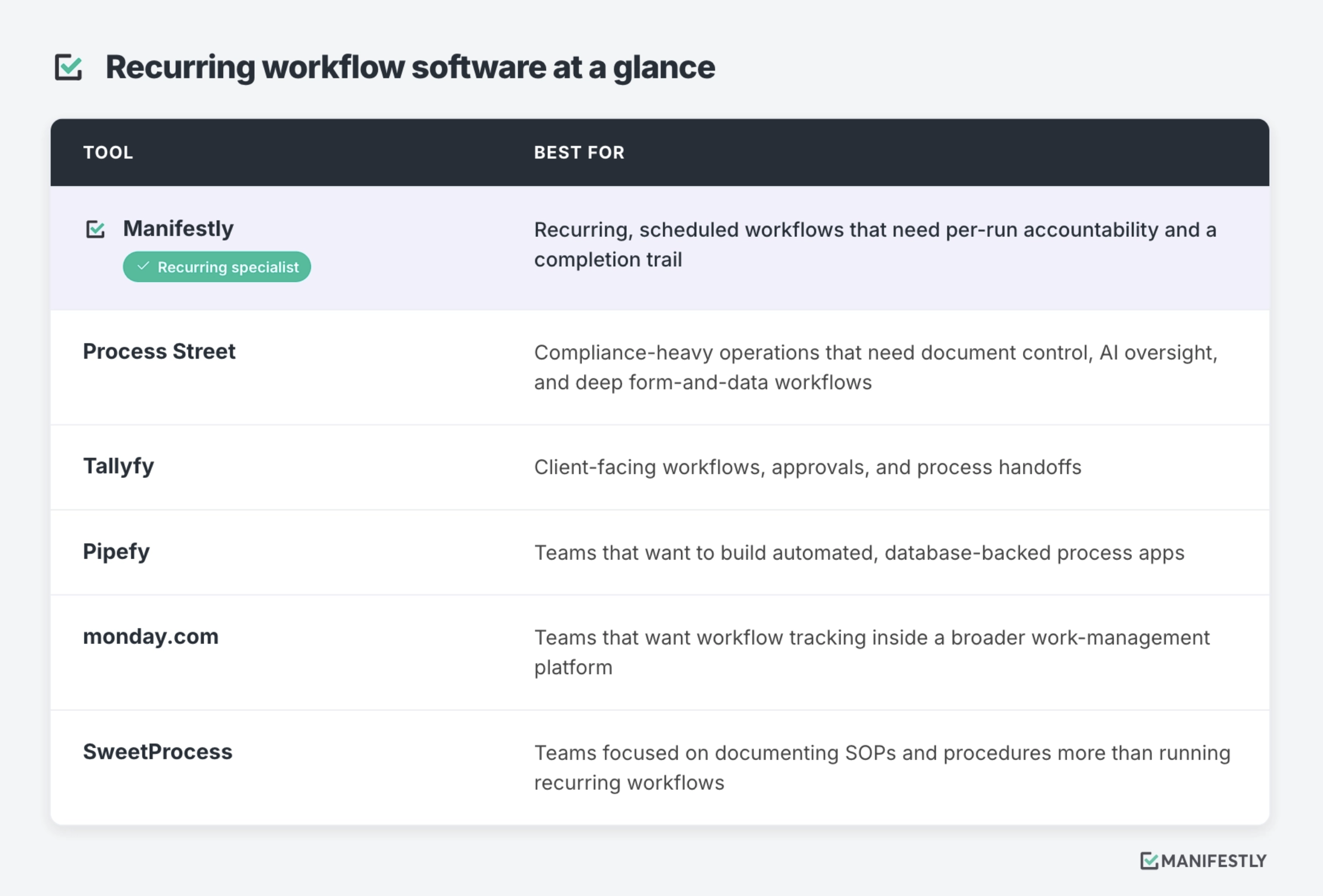
How we evaluated these tools
We evaluated these tools based on how well they support recurring operational work, not just general task management. The criteria included scheduled workflow runs, per-run ownership, reminders, approvals, completion history, audit trail, integrations, ease of use for non-technical operators, and pricing transparency.
We also considered category fit. Some tools are better for documenting SOPs. Some are better for managing projects. Some are better for building custom process apps. This guide focuses on tools that are most relevant to operations teams that need repeatable work to run reliably.
Evaluation criteria
- Recurring and scheduled execution: Can the tool start repeatable workflows on a schedule?
- Per-run accountability: Can each run have assigned owners, due dates, and responsible parties?
- Checkpoints, approvals, and handoffs: Can teams manage work across people and stages?
- Completion history and audit trail: Can teams prove what happened, when, and by whom?
- Ease of use for non-technical operators: Can operations, HR, accounting, property management, and other teams run the process without heavy technical setup?
- Integrations and automation support: Can the tool connect to the systems where work already happens?
- Pricing transparency: Is pricing available, understandable, and easy to compare?
- Category fit: Is the tool best for recurring execution, SOP documentation, project management, or process app building?
Last updated: July 2026
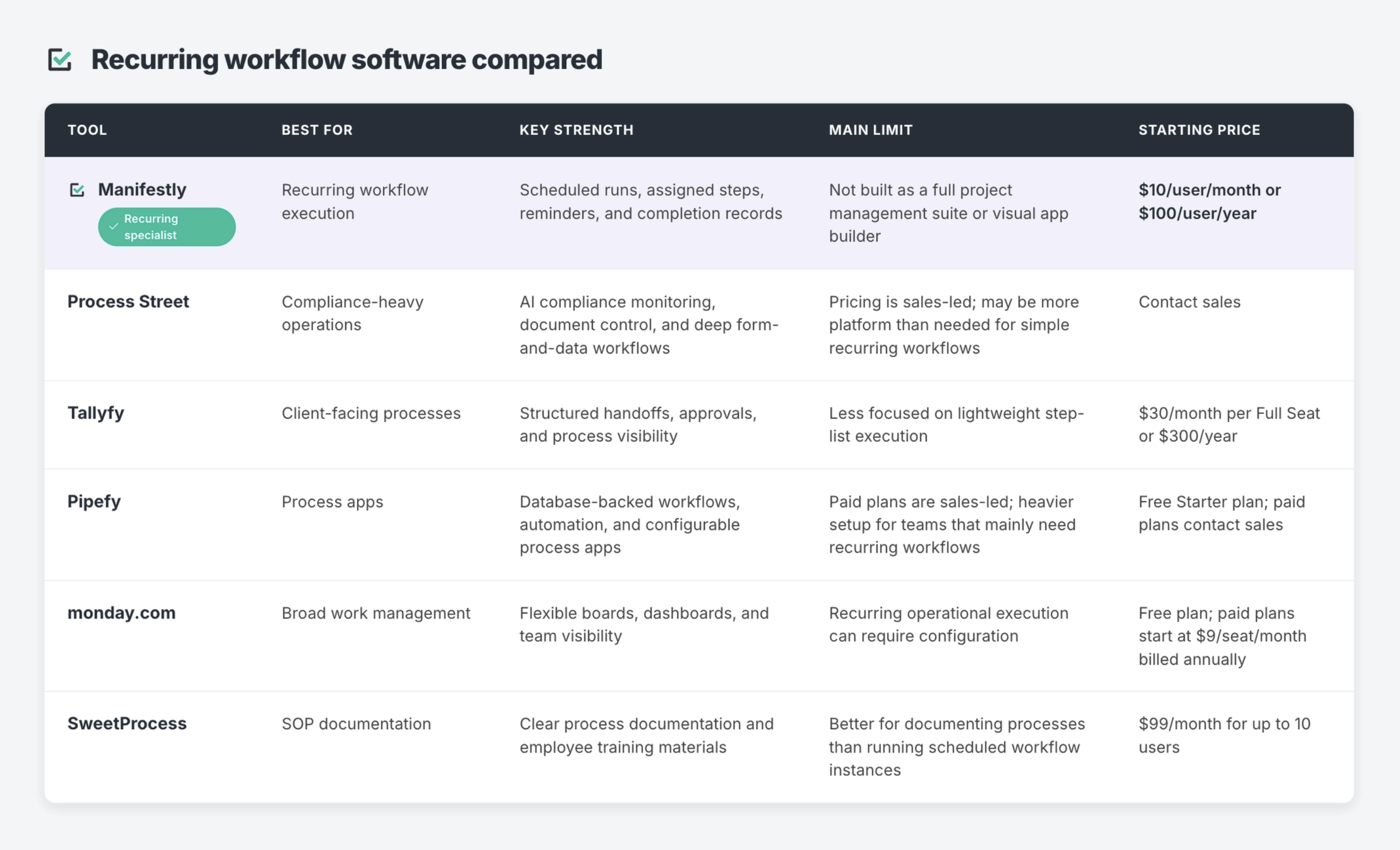
Comparison table
1. Manifestly
Best for: Recurring operational workflows that need to run on schedule, with clear per-step ownership, reminders, and a completion record that proves the work happened.
Manifestly is built around the recurring run. Where most tools let you store a process, Manifestly runs it: you build a workflow template once, set it to recur on any cadence, and each run auto-generates pre-assigned to the right roles, with due dates and reminders calculated automatically. No one rebuilds the checklist for next week’s close or the next new hire.
The distinction that matters for operations teams is per-step accountability inside a single run. IT completes their steps, HR completes theirs, a manager signs off on theirs, all in one run with routing and notifications so each person is prompted when it’s their turn, and full visibility across the team. Every completion is logged with a timestamp and user attribution, producing a searchable, exportable audit trail for each run. And because operators live in Slack and Teams, Manifestly runs there natively, launching runs, completing steps, and sending reminders without switching context.
Key features
- Recurring, scheduled runs on any cadence, pre-assigned to roles
- Per-step role-based assignment and routing within a single run
- Step-level SOP guidance (text, links, images, video embedded where the work happens)
- Searchable, exportable per-run audit trail with timestamps and user attribution
- Native Slack and Microsoft Teams actions (launch, complete, and get reminders in-app)
- Reminders, relative due dates, and completion tracking
- Conditional logic and data collection
- Salesforce, Zapier (6,000+ apps), and a full REST API with webhooks on every plan
- Template library for recurring operational workflows; SOC 2 Type II
- MCP server that connects Manifestly to AI assistants (Claude, ChatGPT, Copilot, Gemini), so an assistant can start runs, complete steps, and advance workflows with human review at defined checkpoints
Manifestly is a strong fit for employee and customer onboarding, accounting close checklists, property management tasks, marketing operations, inspections, and recurring team reviews, standardizing work that has to happen consistently across people, locations, clients, or time periods.
Limits
Manifestly is not a project-management platform for one-off initiatives, and not a visual app-builder like Pipefy. It’s also lighter than a dedicated compliance-operations suite: if you need AI-driven compliance monitoring, document/policy governance, or a relational data layer, a heavier platform will do more. Manifestly is strongest when the process is known and the job is making it run, on time, with proof.
Choose Manifestly if your work is recurring, needs someone accountable for each run, and requires a record that the process was completed, when you need to answer: Did this run? Who owned each step? What’s late? What was completed? Where is it stuck? Can we prove it happened?
Avoid Manifestly if your main need is project planning, visual database building, custom internal apps, or SOP documentation without scheduled execution.
2. Process Street
Best for: Teams running compliance-heavy operations that need document control, AI oversight, and deep form-and-data workflows across departments.
Process Street is a workflow and compliance-operations platform. As of 2026 it’s positioned squarely around compliance, built on three parts: Docs for document and policy management (with governance for standards like ISO 9001 and SOC 2), Ops for workflow automation, and an AI compliance agent that monitors execution in real time, flags compliance risks, and helps enforce controls. For teams whose recurring work is dense with data collection, decision paths, approvals, and regulatory requirements, that depth is the draw.
Its Data Sets feature adds a structured records repository that workflows can reference, and its conditional logic and form handling run deeper than most checklist tools, with variables carried across steps. That makes Process Street a fit for regulated environments, ISO, SOC 2, SOX, HIPAA, GDPR, and similar, where audit-readiness and policy control are the point.
Key features
- AI compliance agent (Cora) for real-time monitoring and control enforcement
- Docs module for document and policy governance
- Data Sets: a structured records repository referenced across workflows
- Deep conditional logic, forms, and data collection with cross-step variables
- Approvals, task assignments, and workflow automation
- Compliance-framework orientation (ISO, SOC 2, SOX, HIPAA, GDPR, and more)
- Integrations and process reporting
Limits
Process Street is more platform than many teams need if the core job is simply running recurring workflows on schedule with clear ownership. The compliance depth, data layer, and configuration surface add weight, and pricing is now custom-quoted rather than published, which raises the entry bar for smaller ops teams.
Choose Process Street if your team needs form-heavy, compliance-driven workflows with deep conditional logic, document control, and AI oversight across multiple process types.
Avoid Process Street if your main need is a lightweight, recurring workflow system with clear accountability, and you don’t need document governance, a data layer, or full compliance tooling.
3. Tallyfy
Best for: Client-facing workflows, approvals, and process handoffs.
Tallyfy helps teams manage structured processes across people, steps, and approvals. It is especially relevant for teams that need visibility into process status and handoffs, including client-facing or approval-gated work.
For operations teams, Tallyfy can be useful when the process involves multiple stakeholders and the core problem is knowing where work stands across a defined sequence.
Key features
- Process templates
- Task assignments
- Approval workflows
- Process tracking
- External stakeholder participation
- Status visibility
- Workflow automation
Limits
Tallyfy is less focused on lightweight checklist execution than tools built specifically around recurring checklists. Teams that mainly need scheduled operational runs, step-level accountability, and recurring completion records may prefer a more checklist-centered tool.
Choose Tallyfy if your processes involve structured handoffs, approvals, and client-facing visibility.
Avoid Tallyfy if your primary need is simple recurring workflow execution for internal operational checklists.
4. Pipefy
Best for: Teams that want to build automated, database-backed process apps.
Pipefy is a process management platform for teams that want to build more configurable workflows and internal process apps. It is useful when teams need automation, structured data, custom process stages, and more control over how work moves through a system.
For operations teams, Pipefy can be a strong choice when the workflow is more complex than a checklist and needs to function like an internal application.
Key features
- Custom process pipelines
- Forms and structured data collection
- Automation rules
- Approvals
- Dashboards and reporting
- Integrations
- Database-backed workflow management
Limits
Pipefy can be heavier than needed for teams that mainly want recurring checklist execution. If the process does not require custom app-like configuration, teams may find a simpler recurring workflow tool easier to adopt.
Choose Pipefy if your team wants to build automated process apps with structured data, custom stages, and configurable workflows.
Avoid Pipefy if your main need is to schedule repeatable checklists, assign steps, send reminders, and track completion without building a more complex process system.
5. monday.com
Best for: Teams that want workflow tracking inside a broader work-management platform.
monday.com is a broad work management platform used for projects, team workflows, dashboards, campaigns, operations, and cross-functional visibility. It can be configured for many different use cases, including recurring operational workflows.
For teams that already use monday.com across the business, it may make sense to manage some recurring work inside the same platform.
Key features
- Boards and views
- Task ownership
- Dashboards
- Automations
- Integrations
- Templates
- Project and workflow tracking
- Team collaboration
Limits
monday.com is not primarily a recurring checklist execution tool. Teams can configure it to support repeatable processes, but scheduled workflow runs, checklist-style completion records, and recurring process accountability may require more setup than a purpose-built tool.
Choose monday.com if your team wants one broad work management platform for projects, tasks, dashboards, and team visibility.
Avoid monday.com if your main need is a purpose-built system for recurring operational checklists with per-run completion history.
6. SweetProcess
Best for: Teams focused on documenting SOPs and procedures more than running recurring workflows.
SweetProcess helps teams document procedures, processes, and policies. It is a strong fit for businesses that need to capture how work should be done, train employees, and organize operational knowledge.
For operations teams, SweetProcess can be useful when the biggest gap is documentation clarity. If the team does not have clear SOPs yet, documenting the process may need to happen before workflow execution can improve.
Key features
- SOP documentation
- Procedure templates
- Process documentation
- Policy documentation
- Team knowledge base
- Employee training support
- Version control and process updates
Limits
SweetProcess is better suited for documenting processes than running scheduled workflow instances. If your team needs recurring assignments, reminders, due dates, completion records, and per-run accountability, a recurring workflow or checklist tool may be a better fit.
Choose SweetProcess if your main need is to document SOPs, train employees, and create a clear process knowledge base.
Avoid SweetProcess if your team already has documented processes and now needs a system to make sure those processes run on schedule.
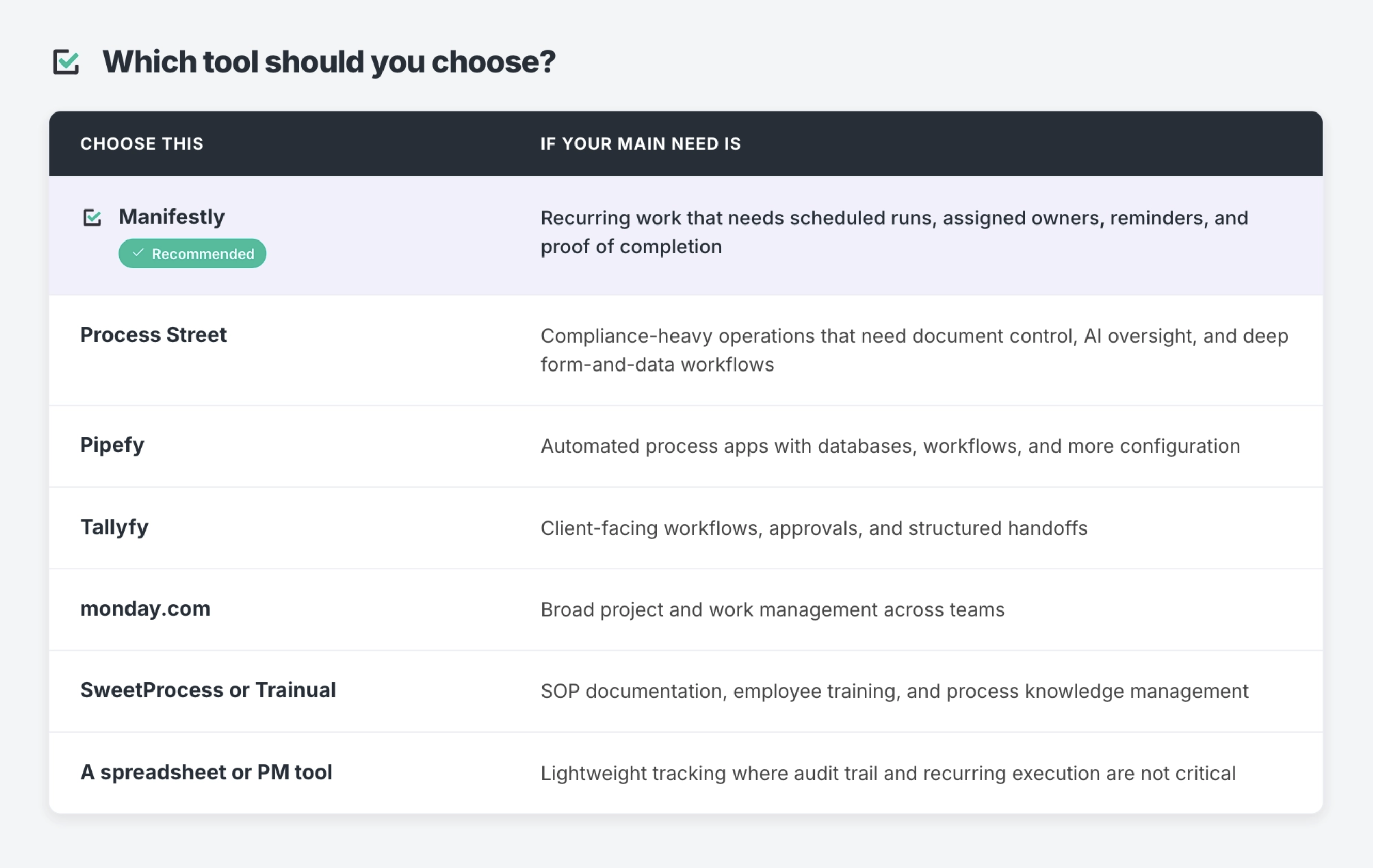
How to choose the right recurring workflow tool
The best tool depends on the kind of work you need to run.
When Manifestly is the right fit
Manifestly is the right fit when recurring operational work needs to happen the same way every time, across multiple people, clients, locations, or departments. It is especially useful when the team already knows the process but lacks a reliable system for running it.
Examples include:
- Employee onboarding checklists
- Customer onboarding workflows
- Monthly accounting close processes
- Property management and safety inspections
- Real estate transaction checklists
- Marketing campaign launch checklists
- Recurring compliance-review runs
- Recurring operations reviews
In these cases, the problem is not documentation. The problem is execution. Someone needs to start the process, own each step, complete the work, and leave a record behind.
Manifestly turns repeatable work into scheduled runs with a clear owner for every step and a record that it got done.
When another tool may be a better fit
Manifestly is not the best choice for every workflow problem.
Choose a broader project management tool like monday.com, Asana, or ClickUp if your team is mainly managing one-off projects with milestones, timelines, dependencies, and changing scopes.
Choose a process app platform like Pipefy if your team wants to build custom internal tools with databases, forms, automations, and more advanced workflow configuration.
Choose an SOP documentation tool like SweetProcess or Trainual if your main need is to write down procedures, train employees, and organize operational knowledge.
Choose a compliance-operations platform like Process Street if your team needs document control, AI-driven compliance monitoring, and deep form-and-data workflows across many departments.
The key question is whether your team needs to document work, manage projects, build apps, or run recurring processes. Those are related problems, but they are not the same buying decision.
Common signs you need recurring workflow software
You may need recurring workflow and checklist software if:
- Important work depends on someone remembering to start it
- Recurring processes are tracked in spreadsheets
- SOPs exist, but people still skip steps
- Managers need status meetings just to find out what happened
- Work is assigned informally through Slack or email
- There is no clear record of who completed each step
- Audits or reviews require manual evidence gathering
- Onboarding, inspections, close processes, or recurring reviews vary by person or location
The more often a process repeats, the more valuable it becomes to move the work out of memory and into a system.
Final recommendation
The best recurring workflow and checklist software depends on what your team needs the system to do.
If you need broad project management, choose a tool built for projects. If you need SOP documentation, choose a tool built for knowledge capture and training. If you need custom process apps, choose a platform built for workflow automation and structured data.
If your operations team needs recurring work to be scheduled, assigned, reminded, completed, and recorded, Manifestly is built for that job.
FAQ
What is recurring workflow software?
Recurring workflow software helps teams run repeatable processes on a schedule. It creates workflow runs, assigns steps, sends reminders, tracks progress, and keeps a history of completed work.
What is the difference between workflow software and project management software?
Workflow software is usually designed to move repeatable work through a defined process. Project management software is usually designed to manage one-off projects with timelines, milestones, resources, and changing scopes.
The difference is not always absolute. Many project management tools can be configured for workflows, and many workflow tools include task management. The buying question is whether your team mainly needs to manage projects or run repeatable processes.
What is the difference between checklist software and SOP software?
Checklist software helps teams complete steps in a process. SOP software helps teams document how a process should be done.
Some teams need both. An SOP explains the process. A checklist helps the team execute the process. Recurring workflow software goes one step further by scheduling the checklist, assigning steps, sending reminders, and keeping a completion record.
Do I need recurring workflow software if I already use monday.com, Asana, or ClickUp?
You may not need a separate tool if your current project management system reliably starts each recurring process, assigns the right people, sends reminders, tracks completion, and keeps a record for each run.
You may need dedicated recurring workflow software if your project management tool is being used mostly as a task board, and recurring operational work still depends on manual setup, memory, or follow-up.
What is the best recurring checklist software for operations teams?
The best tool depends on the type of recurring work. Manifestly is a strong fit for operations teams that need scheduled checklists, assigned steps, reminders, and completion records. Process Street may be better for compliance-heavy workflows. Pipefy may be better for teams building custom process apps. monday.com may be better for teams that want recurring work inside a broader project management platform.
What is the best free recurring workflow software?
The best free option depends on whether you need documentation, task tracking, or recurring workflow execution. Free plans can work for small teams testing a process, but operations teams usually need paid features once they require assignments, reminders, permissions, audit trails, integrations, or reliable recurring schedules.
When should a team use Manifestly instead of a project management tool?
Use Manifestly when the work is repeatable, checklist-driven, and needs a clear completion record. Project management tools are usually better for one-off projects, timelines, milestones, and cross-functional planning. Manifestly is better when the same operational process needs to run reliably again and again.
Can recurring workflow software help with audits and compliance?
Yes. Recurring workflow software can help teams create a record of completed steps, assigned owners, timestamps, and process history. That can make audits, inspections, reviews, and compliance checks easier to manage because the evidence is captured as the work happens.