


Business Process Optimization: Strategies, Tools, and Real-World Examples
May 21, 2025
What Is Business Process Optimization?
Business process optimization is the practice of improving how work gets done by identifying inefficiencies, removing unnecessary steps, and redesigning processes to produce better results. The goal may be to reduce costs, shorten turnaround times, improve quality, or make work more consistent across a team.
Consider employee onboarding. A company may have a documented process for collecting paperwork, setting up accounts, preparing equipment, and training new hires. Yet each new employee still requires the hiring manager to coordinate tasks between HR, IT, and other departments.
The process is documented, but the way it runs leaves room for improvement.
Business process optimization examines where work slows down, what causes delays or mistakes, and how the process can be improved. That might mean removing duplicate approvals, changing when tasks begin, clarifying ownership, or automating routine steps.
The challenge is making those improvements work consistently. A redesigned process only delivers lasting value when the people responsible can follow it, handle exceptions, and measure whether it performs better.
How to Optimize a Business Process in 6 Steps
You don’t need to redesign every operation in your business at once. Start with one process that regularly takes longer than expected, creates unnecessary follow-up, or produces inconsistent results.
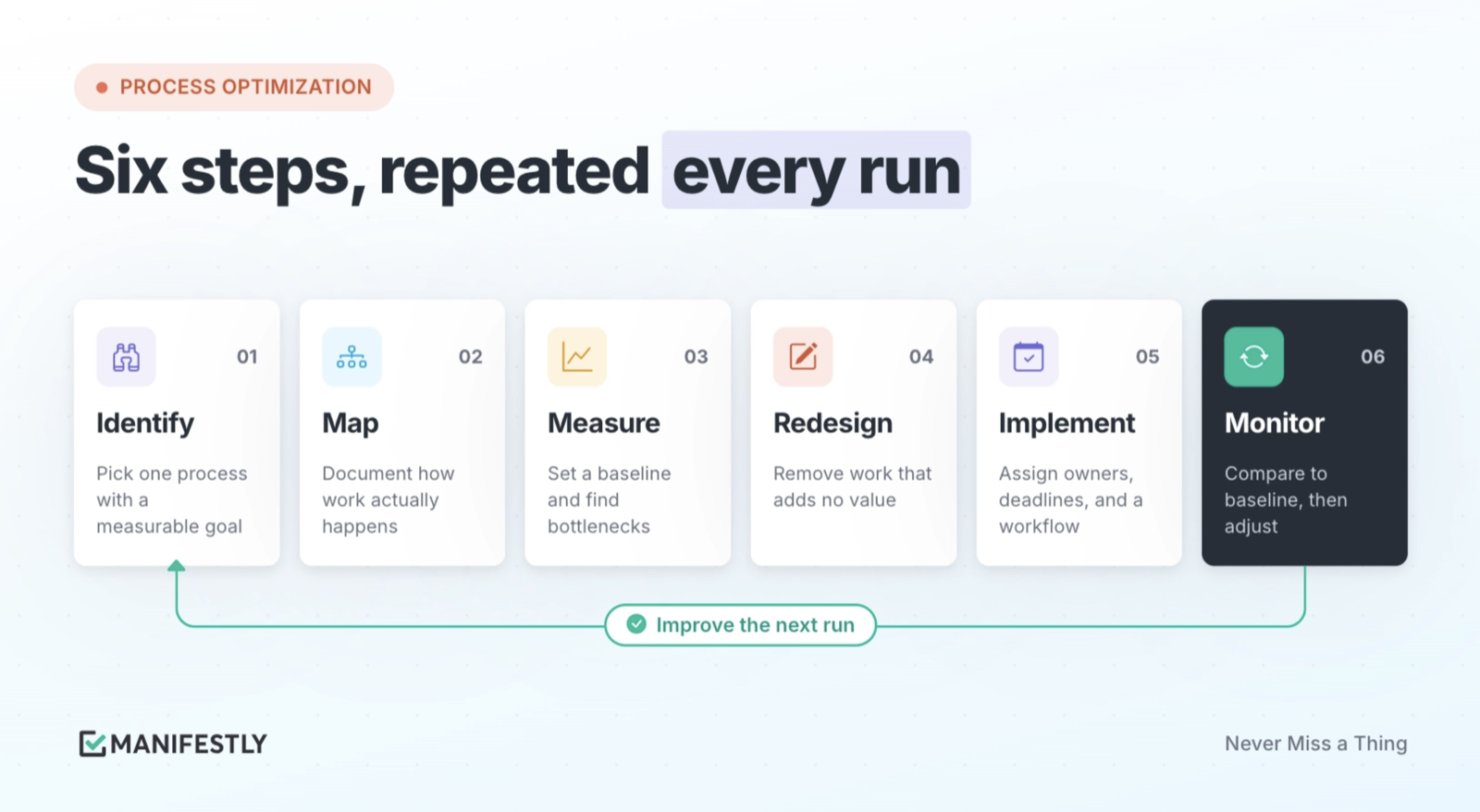
The following six steps provide a practical approach to business process optimization.
1. Identify the process you want to improve
Choose a process with a clear purpose and measurable outcome. Good candidates include employee onboarding, customer onboarding, monthly financial close, purchase approvals, and recurring inspections.
Define what the process should accomplish and why it needs attention.
For example, an accounting team may want to reduce the time required to complete month-end close without sacrificing the quality of its financial reviews.
Be specific about the problem. “Improve accounting efficiency” is difficult to measure. “Complete monthly reconciliations by the fifth business day” gives the team a clear objective.
2. Map how the process currently works
Document the actual sequence of work, including the people involved, required information, handoffs, approvals, and tools.
Pay attention to what happens between steps. A process may appear straightforward in an SOP while requiring several emails, status meetings, or manual reminders to keep it moving.
For a monthly close, map when financial data becomes available, who completes each reconciliation, how supporting documents are collected, and who reviews the results.
The goal is to understand how work actually happens, not simply how the process was intended to operate.
For a deeper look at documenting and organizing these steps, see our guide to workflow design and mapping.
3. Measure performance and identify bottlenecks
Establish a baseline before making changes. Depending on the process, useful measures include:
- Cycle time: How long does the process take from beginning to end?
- Waiting time: Where does work sit before the next person acts?
- Error and rework rates: How often must completed work be corrected?
- On-time completion: How consistently does the process meet its deadlines?
- Coordination effort: How much time do people spend requesting updates or following up?
Look for recurring patterns rather than isolated mistakes.
If monthly close consistently stalls during management review, investigate why. Perhaps reviewers receive incomplete information, deadlines are unclear, or approvals depend on someone noticing an email.
An additional reminder may help temporarily. Fixing the underlying handoff is more likely to improve the process.
4. Redesign the process to remove unnecessary work
Use what you learned to simplify the process.
Remove steps that no longer serve a purpose, combine duplicate activities, clarify responsibilities, and change the sequence of work where necessary.
Look for opportunities to automate repetitive administrative tasks, but don’t assume every manual step is wasteful. Reviews, approvals, and professional judgments may be essential to the quality of the result.
For example, an accounting team might standardize reconciliation instructions, require supporting documents before management review, and automatically notify reviewers when their assigned work is ready.
The objective is to make necessary work easier to complete while preserving the controls that matter.
5. Implement the improved process
A process improvement needs to become part of how the team works.
Update the standard operating procedure, communicate the changes, and make sure each step has a clear owner and deadline. Define how the process starts, how work moves between people, and what happens when a step cannot be completed as expected.
For recurring processes, consider using workflow software to organize assignments, deadlines, review steps, and completion records.
This is where process documentation becomes operational. An SOP describes how the work should happen. A workflow provides the structure for carrying it out and tracking each instance.
Learn more about process execution and how to improve it, or follow our guide to turning an SOP into a recurring workflow.
6. Monitor results and improve the next run
Measure the redesigned process against the baseline established in step three.
Did the monthly close finish sooner? Were fewer corrections needed? Did managers spend less time chasing updates? Were reviews completed on schedule?
Evaluate several runs before drawing conclusions. A single successful month may reflect favorable circumstances rather than a reliable improvement.
Collect feedback from the people completing the work and examine where delays or exceptions still occur. Then update the process and test the changes again.
Business process optimization is an ongoing practice. The goal is not to create a perfect procedure once, but to build a process that can improve as the business and its requirements change.
Business Process Optimization Methods and Strategies
Different optimization methods provide different ways to understand and improve business processes. The right approach depends on the problem you’re trying to solve.
Some processes suffer from unnecessary steps and excessive waiting. Others experience recurring quality issues, inconsistent results, or unclear responsibilities.
Three established methods are Lean, Six Sigma, and continuous improvement through Kaizen.
Lean: Eliminate Waste and Improve Flow
Lean focuses on maximizing value while reducing work that does not contribute to the desired outcome.
As explained by the Lean Enterprise Institute, Lean thinking starts with understanding value from the customer’s perspective, examining how that value is created, and improving the flow of work.
Consider an employee onboarding process that requires HR to enter the same information into several systems. Some duplication may be unavoidable, but repeated manual entry can increase processing time and create opportunities for errors.
A Lean approach would examine the flow of information and look for steps that can be removed, combined, or automated.
Lean is particularly useful when a process involves excessive waiting, unnecessary movement of information, repeated work, or avoidable handoffs.
Six Sigma: Reduce Errors and Process Variation
Six Sigma uses data and statistical methods to identify the causes of defects and inconsistent results.
One of its central methods is DMAIC, a structured improvement approach described by the American Society for Quality. It organizes process improvement into five phases: Define, Measure, Analyze, Improve, and Control:
- Define: Identify the problem and the desired outcome.
- Measure: Establish current process performance.
- Analyze: Determine the underlying causes of defects or variation.
- Improve: Test and implement changes.
- Control: Monitor the process to sustain the improvement.
For example, a financial services team might discover that client applications frequently require corrections because required information is missing.
Rather than adding another review at the end, the team could examine where the errors originate and change how information is collected or validated earlier in the process.
Six Sigma is especially useful when quality, accuracy, and consistency matter and the team has sufficient data to investigate recurring problems.
Kaizen: Make Continuous Improvement Part of Everyday Work
Kaizen emphasizes ongoing improvement through relatively small, practical changes.
Instead of waiting for a large process redesign, teams regularly identify friction, test improvements, and incorporate what works into their standard procedures.
A property management team might notice that maintenance requests repeatedly stall because required information is missing. It could update the intake process, test the change over several weeks, and compare the results.
This approach works well for recurring operations because each new run creates another opportunity to evaluate whether the process is working.
These methods can complement one another. Lean may help simplify the process, Six Sigma may help investigate recurring quality problems, and Kaizen can provide a routine for continuing improvement.
Tools for Business Process Optimization
Business process optimization often involves several kinds of software. Some tools help teams understand existing work, while others help implement improvements and measure the results.
Choosing the right tools starts with understanding which part of the process needs support.
Process Mapping Tools
Process mapping tools help teams visualize the steps, decisions, and handoffs involved in a business process.
Tools such as Lucidchart and Microsoft Visio can be used to create flowcharts, identify dependencies, and document how work moves between teams.
These diagrams are useful when analyzing a process, especially when several departments or systems are involved.
However, a process map describes how work should flow. It does not automatically assign work or track whether each step is completed.
Process Measurement and Analysis Tools
Before improving a process, teams need enough information to understand its performance.
Spreadsheets, reporting tools, and business intelligence platforms can help analyze cycle times, error rates, costs, and other operational measures.
For more complex processes, specialized analytics or process mining tools may help organizations examine activity across business systems and identify recurring delays or variations.
The appropriate level of analysis depends on the process. A small team may learn enough by reviewing recent workflow runs, while a large organization may need detailed operational data from several systems.
Workflow Automation Tools
Workflow automation software reduces repetitive manual actions and connects activities across applications.
For example, Zapier can help teams move information between systems or trigger actions when defined events occur.
Automation may eliminate duplicate data entry, reduce manual notifications, or start a process when an event happens in another system.
But automating a poorly designed process can preserve its problems while making them happen faster.
Before introducing automation, determine which steps are necessary, what information they require, and where human judgment or review remains important.
AI can also assist with bounded tasks such as drafting, summarizing, or reviewing information. These capabilities are most useful when the workflow makes clear what the AI should do, what needs human review, and who remains responsible for the result.
Our guide to turning an SOP into an AI-assisted workflow explains how to connect documented procedures with structured execution and AI assistance.
Workflow Execution Software
Workflow execution software helps teams carry out repeatable processes with clear assignments, deadlines, review requirements, and completion records.
This addresses a different challenge from process mapping or data automation.
A monthly close process, for example, may already be documented and supported by accounting software. Yet someone still needs to coordinate reconciliations, follow up on delayed steps, collect supporting information, and confirm that reviews are complete.
Manifestly helps teams turn recurring procedures into workflows that can be assigned, scheduled, tracked, and reviewed.
Each workflow run provides a record of the steps completed, information collected, and actions recorded during execution. Teams can use that history to understand where work stalled and what needs to change before the next run.
For more on this distinction, see What Is SOP Execution Software?
The best optimization tool is the one that addresses the actual constraint. A team struggling to understand its process may need mapping. A team struggling with repetitive data entry may need automation. A team repeatedly chasing the same handoffs may need a better way to execute and track its workflows.
Business Process Optimization Examples
The following examples show how optimization principles apply to common business operations. The first three are illustrative scenarios, while the final example describes a documented Manifestly customer.
Example 1: Improving Month-End Close
An accounting team has a standard monthly close procedure. Each month, staff complete reconciliations, gather supporting information, prepare reports, and submit work for review.
Yet the close regularly runs late.
After mapping the process, the team identifies a recurring problem: reviewers often receive reconciliations without the supporting documentation needed to approve them.
The team changes the workflow so that required documents are collected before the review step. Each reconciliation has a named owner and deadline, and the reviewer can see which items are ready.
The process itself hasn’t become fundamentally different. The improvement is in how information moves between steps and how the team coordinates the work.
The team can measure whether the change reduces review delays, correction requests, and total close time.
Example 2: Improving Employee Onboarding
A growing company has an onboarding SOP describing everything that must happen before a new employee starts.
HR collects paperwork, IT prepares accounts and equipment, and the hiring manager organizes training.
The problem is that these activities happen across separate teams, with the hiring manager coordinating progress through messages and email.
The company improves onboarding by defining a standard sequence of tasks, assigning ownership, and establishing deadlines relative to the employee’s start date.
Rather than relying on the manager to remember each handoff, the workflow makes outstanding work visible to the people responsible.
The company can then compare onboarding runs to determine whether important preparations consistently finish on time and where delays still occur.
Example 3: Optimizing Property Management Inspections
A property management company conducts recurring property inspections across multiple buildings.
Each inspection requires staff to check property conditions, document issues, collect photographs, and report maintenance needs.
When inspection records are stored in separate documents or messages, managers may struggle to determine which locations have been inspected and which reported problems still require follow-up.
An improved process uses a consistent inspection checklist with clear assignments, required information, and deadlines.
Completed inspection records can be reviewed, while identified issues receive their own follow-up responsibilities through the appropriate maintenance process.
The optimization is not simply collecting inspection results faster. It is making sure the information reaches the person responsible for acting on it.
The company can measure inspection completion rates, outstanding issues, and the time between identifying and resolving maintenance problems.
Real-World Example: Enel X and Standardized Workflows
Enel X, a global energy business, provides an example of how standardized workflows can support complex recurring operations.
In a Manifestly customer story published in 2019, Enel X described using Manifestly to coordinate operational procedures across teams and countries.
The company’s processes included dispatch requests, submissions, quality-control activities, and work that one team might begin and another team would finish.
At the time of the case study, Enel X reported using more than 430 workflows in Manifestly. The team also described reduced errors, the ability to update procedures quickly, and the value of retaining searchable records of completed work.
The example illustrates an important part of business process optimization: once a better procedure has been established, teams need a reliable way to use it repeatedly and maintain a record of execution.
How to Measure Business Process Optimization Results
A process improvement should produce a measurable difference in how work gets done.
The right metrics depend on the purpose of the process, but several measures apply across many industries.
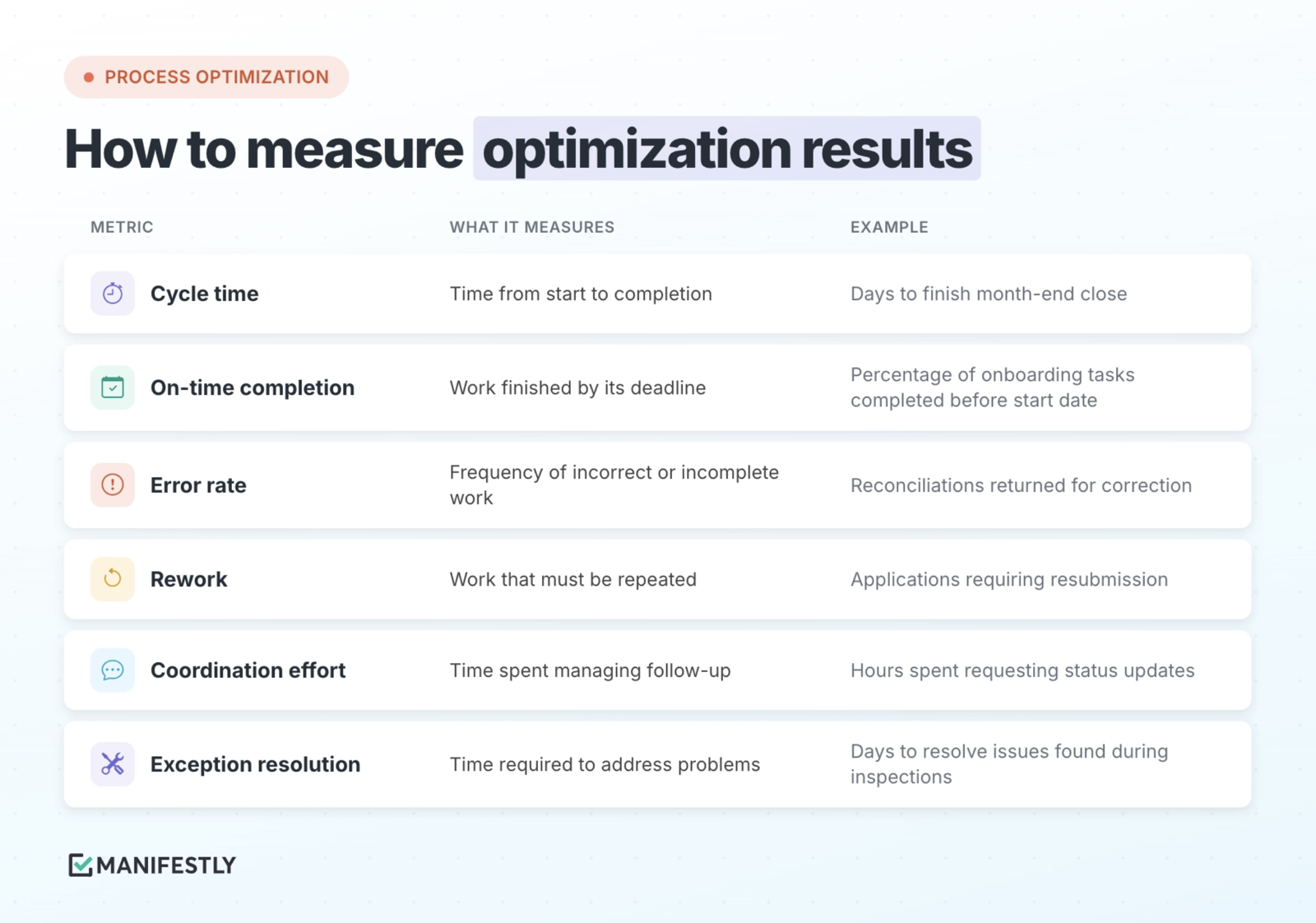
Compare performance before and after implementing a change, using enough process runs to identify meaningful patterns.
For example, if monthly close finishes two days earlier after a redesign, investigate what contributed to the improvement. Was work completed faster? Did reconciliations reach reviewers sooner? Were there fewer corrections?
The answer matters because not every faster process is a better process.
Reducing review time by skipping an important control may improve one metric while creating additional risk.
Effective optimization balances speed and cost against quality, consistency, and the requirements of the work.
Common Challenges in Business Process Optimization
Process improvement efforts often encounter challenges that have less to do with the proposed solution than with how the work is understood and implemented.
Optimizing the Document Instead of the Process
A team may spend significant time rewriting its SOP without changing how work is assigned, reviewed, or completed.
Better documentation can help, especially when instructions are incomplete or confusing. But if the same handoff still depends on someone remembering to send an email, the underlying coordination problem remains.
The improvement needs to address how the work runs, not only how it is described.
Automating Before Understanding the Problem
Automation can remove repetitive work, but it can also make an inefficient process harder to change.
Before introducing automation, establish why each step exists and whether it contributes to the desired result.
Remove unnecessary work first. Then automate the steps that benefit from it.
Making Changes Without Involving the Team
People who perform a process often know where the instructions differ from reality.
They understand which steps regularly create delays, where information goes missing, and which exceptions require judgment.
Involving them early helps identify practical problems and creates an opportunity to test whether the proposed improvements actually work.
Failing to Monitor the Improved Process
A successful redesign may gradually lose its effectiveness if responsibilities change, instructions become outdated, or new requirements emerge.
For recurring work, reviewing completed runs can reveal patterns that might otherwise remain hidden.
A missed deadline may be an isolated event. The same missed deadline every month suggests something in the process needs attention.
Make Process Improvement Part of the Work
Choose one recurring process that regularly requires extra follow-up, experiences delays, or produces inconsistent results.
Map the work, identify where it breaks down, and make one meaningful improvement. Then put the revised process into practice and measure what happens over the next several runs.
If the process still depends on someone remembering every handoff, the improvement may need more than better documentation.
Manifestly helps teams turn recurring procedures into assigned workflows with deadlines, review steps, reminders, and completion records.
Start a free trial of Manifestly and test your improved process with the people who actually run it.
A process is not optimized simply because its steps are better organized. The improvement has to hold up when the work happens again.
Frequently Asked Questions About Business Process Optimization
What is the main goal of business process optimization?
The goal is to improve how a business process performs. Depending on the process, that may mean reducing costs, shortening cycle times, improving quality, eliminating unnecessary work, or increasing consistency.
A successful optimization effort should have a clearly defined outcome that can be measured.
What is the first step in business process optimization?
Start by identifying a specific process and defining what needs to improve. Then document how the process currently works and establish baseline performance measures.
Without understanding the existing process, it’s difficult to determine which changes will produce meaningful improvements.
What is the difference between business process optimization and business process management?
Business process management (BPM) is the broader practice of designing, managing, monitoring, and improving organizational processes. As described in IBM’s overview of business process management, BPM provides a systematic approach to examining and managing business processes.
Business process optimization focuses specifically on identifying and implementing changes that improve process performance. Optimization can be one part of an ongoing business process management program.
What is the difference between process optimization and process automation?
Process optimization examines how work can be improved. Process automation uses technology to perform defined activities with less manual intervention.
Automation may be part of an optimization strategy, but the two are not interchangeable. Some of the most valuable improvements involve removing unnecessary steps, clarifying responsibilities, or changing how work is reviewed.
How do you know whether a process improvement worked?
Compare performance before and after the change using measures tied to the process objective.
For recurring processes, review multiple completed runs to determine whether the improvement is consistent and whether new problems have appeared.
What are some examples of business process optimization?
Common examples include reducing delays in employee onboarding, simplifying purchase approvals, improving month-end close, standardizing property inspections, reducing errors in customer intake, and automating repetitive reporting tasks.
The most effective improvements address a specific problem and produce a measurable change in the result.