
New Feature: SMS Notifications for Workflows
January 02, 2026
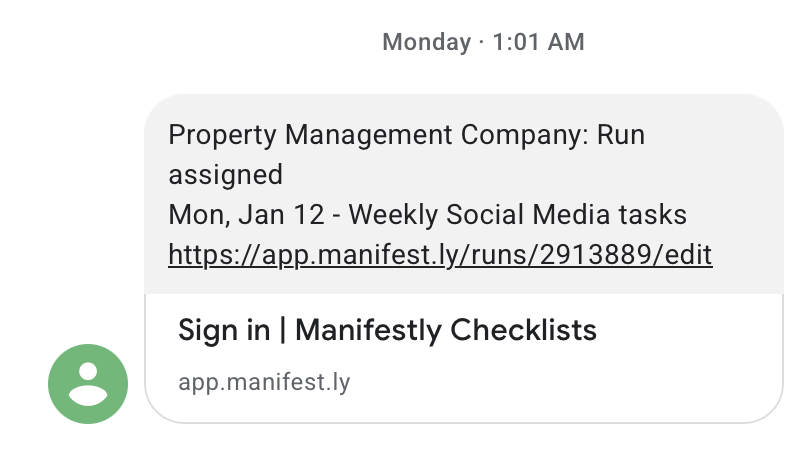
Manifestly can now send text messages for critical workflow events — new runs, assignments, mentions, reminders, and late work — so your team never misses an important moment.
Not everyone is sitting at a desk when something urgent happens. A new run kicks off, a step goes overdue, or someone @mentions you — and the notification sits unread in an inbox until it's too late. SMS notifications fix that by delivering alerts directly to your phone as a text message.
Which events can trigger an SMS?
You choose exactly which notifications you want by text. Options include:
- Mentions — when someone @mentions you in a run comment or step
- Reminders — scheduled nudges that keep work on track
- New assignments — when you're assigned a step
- Late assignments — when work you own becomes overdue
- Run status alerts — when a run is started, completed, almost late, or late
- Team changes — when a new user joins (optional)
Getting started
- Add your phone number in your notification settings.
- Verify it with a one-time code sent by SMS.
- Pick the events you want delivered by text and set the scope where available.
A good rule of thumb: keep SMS for the alerts that truly require immediate attention, and leave the rest on email or chat.
Privacy and control
- Per-user preferences — each person decides what they receive.
- Verified delivery — texts only go to numbers that have been confirmed.
- Consistent model — SMS follows the same notification logic as email and chat integrations, so there are no surprises.
Who can use it
SMS notifications are available for Enterprise customers. If you're interested, head to the settings page in the app to enable them for your account.
Check out the full feature details for a closer look at how it works.
Table of Contents