
What Is SOP Execution Software?
October 15, 2026
SOP execution software turns standard operating procedures into assigned, scheduled, and trackable work. It lets teams create a separate workflow run each time a procedure is needed, coordinate the steps, and keep a record of completion, submitted evidence, and review.
Consider employee onboarding. The SOP explains how HR collects paperwork, IT prepares equipment and access, and the manager plans the first week. But two days before a new hire starts, the team still needs to know whether the laptop is ready, which access requests are outstanding, and who should follow up.
The document explains the procedure. A workflow run gives those responsibilities a place to happen for this particular employee.
That is the execution problem SOP execution software helps solve: connecting a written standard to the people, timing, handoffs, and records needed each time the work occurs.
What is the difference between an SOP and a workflow?
An SOP, or standard operating procedure, defines how a procedure should be performed. A workflow organizes the steps and handoffs through which the work moves. To understand execution software, it helps to distinguish the standard, the reusable template, and each individual run.
The SOP defines the standard. An employee onboarding SOP might explain which forms are needed, how access is authorized, and what must be ready before the employee starts. It gives people instructions and criteria for doing the work correctly.
The workflow template organizes execution. The template turns that guidance into steps with assignments, timing, data collection, and review where needed. HR collects the forms. IT prepares equipment. The manager confirms the first-week schedule.
The workflow run applies the template to one occurrence. Onboarding a particular employee creates a run with that employee's information, start date, assigned team members, and completion history. The next employee gets a separate run from the same template.
This distinction matters because the standard can remain the same while the work changes every time. Different people are involved. Deadlines move. Exceptions arise. Each occurrence needs its own record.
An SOP can describe a workflow, and a workflow can include instructions from several SOPs. Execution software connects the guidance to the work people are responsible for completing.
Why do documented SOPs still fail?
A documented SOP can be accurate and useful while the procedure still runs inconsistently. The missing part is often how the work starts, reaches the right people, and moves through the team.
In onboarding, HR may know that IT needs to prepare a laptop. IT may know how to configure it. But if the handoff depends on someone remembering to send a message, the procedure remains fragile. Writing more detailed laptop instructions will not fix that handoff.
The same problem appears in month-end close, client onboarding, property inspections, and access reviews. People know what should happen, but the process still asks them to remember when to act, infer who owns the next step, or chase an update.
Research on procedural compliance also points to a broader issue: the procedure may not fit the conditions in which people work. Hudson et al., in Bending the Rules II, examined why people break rules or fail to follow procedures. Their findings emphasize planning, supervision, and improving procedures rather than treating non-compliance primarily as an individual failing.
That distinction matters in practice. Writing in Drilling Contractor, Marcin Nazaruk explains why “failed to follow procedure” is an incomplete explanation for an incident. Procedures may be outdated, difficult to access, or impractical under actual working conditions. Understanding the gap between the written procedure and the work gives teams a way to improve it.
Structured checks at the point of work can also make a difference. In a 2009 study across eight hospitals, Haynes and colleagues found that introducing the WHO Surgical Safety Checklist was associated with inpatient deaths falling from 1.5% to 0.8% and complications from 11% to 7%. This was a before-and-after study, not a randomized trial or a test of SOP execution software. It offers evidence for bringing procedural checks into the work itself, while leaving open which parts of the implementation produced the improvement.
For recurring operations, the practical lesson is to examine both the procedure and the conditions needed to carry it out. Better coordination will not rescue an unusable standard, and a well-written standard still needs a reliable way to reach people when they need to act.
Reliable recurring work needs answers to a few practical questions:
- What starts the procedure?
- Who is responsible for each step, and when is it due?
- How does the team know what is complete or overdue?
- Who handles a blocker or an exception?
- What evidence or review is needed before the work is accepted?
- What record remains afterward?
Those answers should be designed into the work before a handoff fails. We examine this gap further in Why SOPs Fail After They Are Written.
SOP documentation software vs. SOP execution software
SOP documentation software helps teams capture, organize, and maintain instructions. SOP execution software helps teams apply those instructions each time the procedure runs.
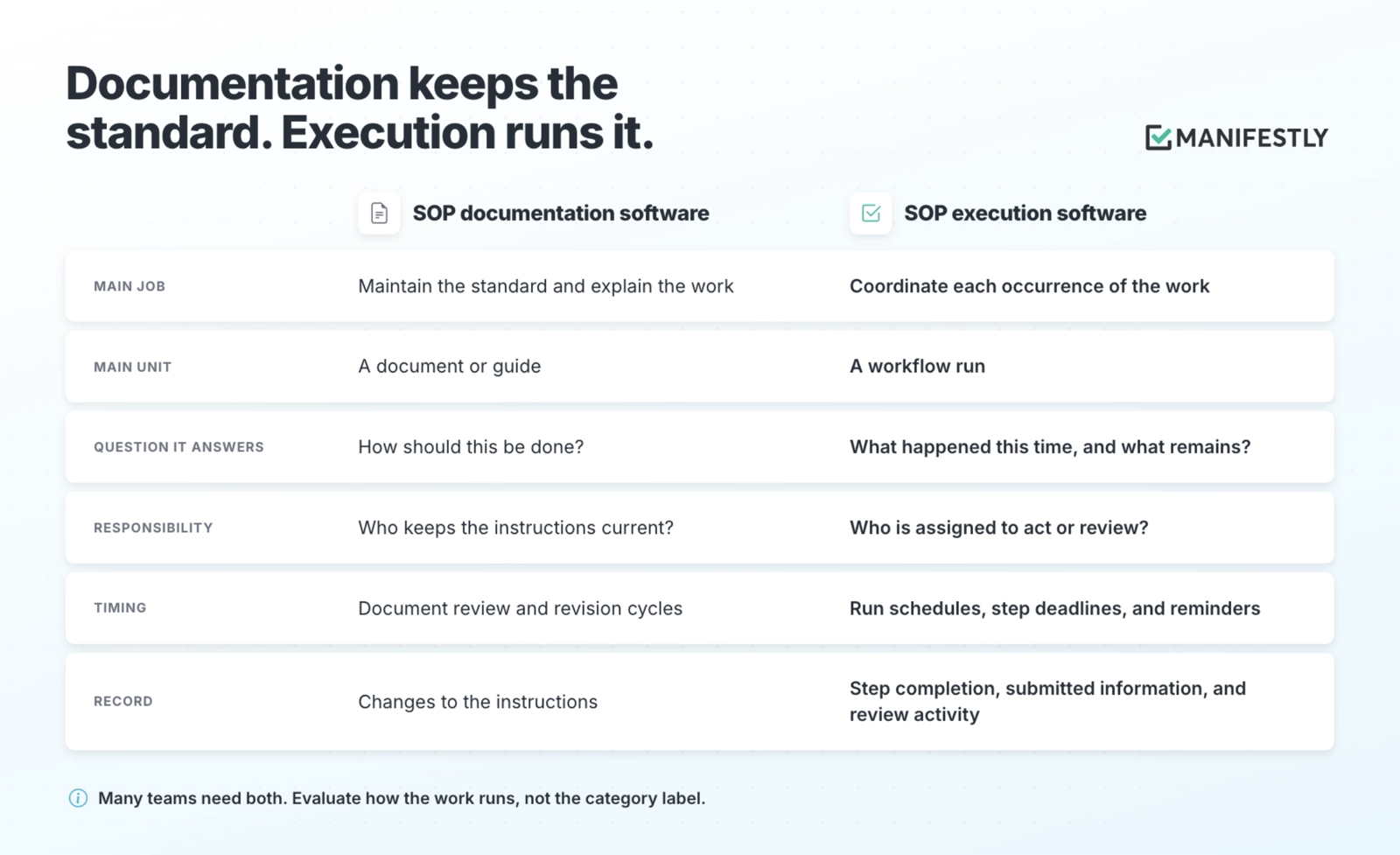
Many teams need both functions. People need clear guidance, and they need a reliable way to act on it. Some platforms provide both, so evaluate how the work runs rather than relying on the category label.
An onboarding guide can explain how to request system access. A workflow run can show whether the request has been submitted for a particular employee, who needs to approve it, and whether anything is overdue. The instructions remain useful; the run makes the current responsibility explicit.
What capabilities should you look for?
Start with the work your team needs to coordinate. The useful question is whether the software supports that procedure through assignments, handoffs, exceptions, and completion.
Reusable templates and separate runs
You should be able to build the procedure once and launch a separate run each time it is needed. Each onboarding run should retain its own employee details, assignments, deadlines, and record.
Assignments and responsibility
Look for ways to assign work to people or use role-based assignments. A named person responsible for the overall run can also help when several departments are involved. Decide who follows up on incomplete work and who can resolve exceptions.
Schedules, triggers, and due dates
Some procedures use recurring schedules, such as a monthly access review. Others start with an event, such as a new hire or signed contract. Check how the software starts runs and calculates deadlines. For onboarding, relative due dates based on the employee's start date are often more useful than dates entered separately for every step.
Reminders and status visibility
People should be able to see their assigned work, while the person coordinating the procedure can see what is incomplete or overdue. Reminders reduce manual follow-up, but the team still needs to decide who acts when a reminder does not resolve the problem.
Data collection and completion records
Look for data collection that captures the information needed to establish what happened: equipment details, submitted forms, inspection photos, or confirmation of an access change. Check which information can be required and what history the software retains.
Review and approvals
Some steps need another person's judgment before the work can proceed. Check how workflow approvals behave, who can approve, and what happens when a reviewer requests changes. Place review where an error would matter, rather than adding approval to every step by default.
Conditional steps and integrations
Different circumstances may require different work. A remote employee may need equipment shipped, while an office employee needs a desk prepared. Conditional steps can accommodate those differences. Integrations can connect the procedure to the systems that supply its information or receive its results.
The right combination depends on the procedure. A routine internal check and a complex cross-department onboarding process will not need identical controls.
How does SOP execution software work?
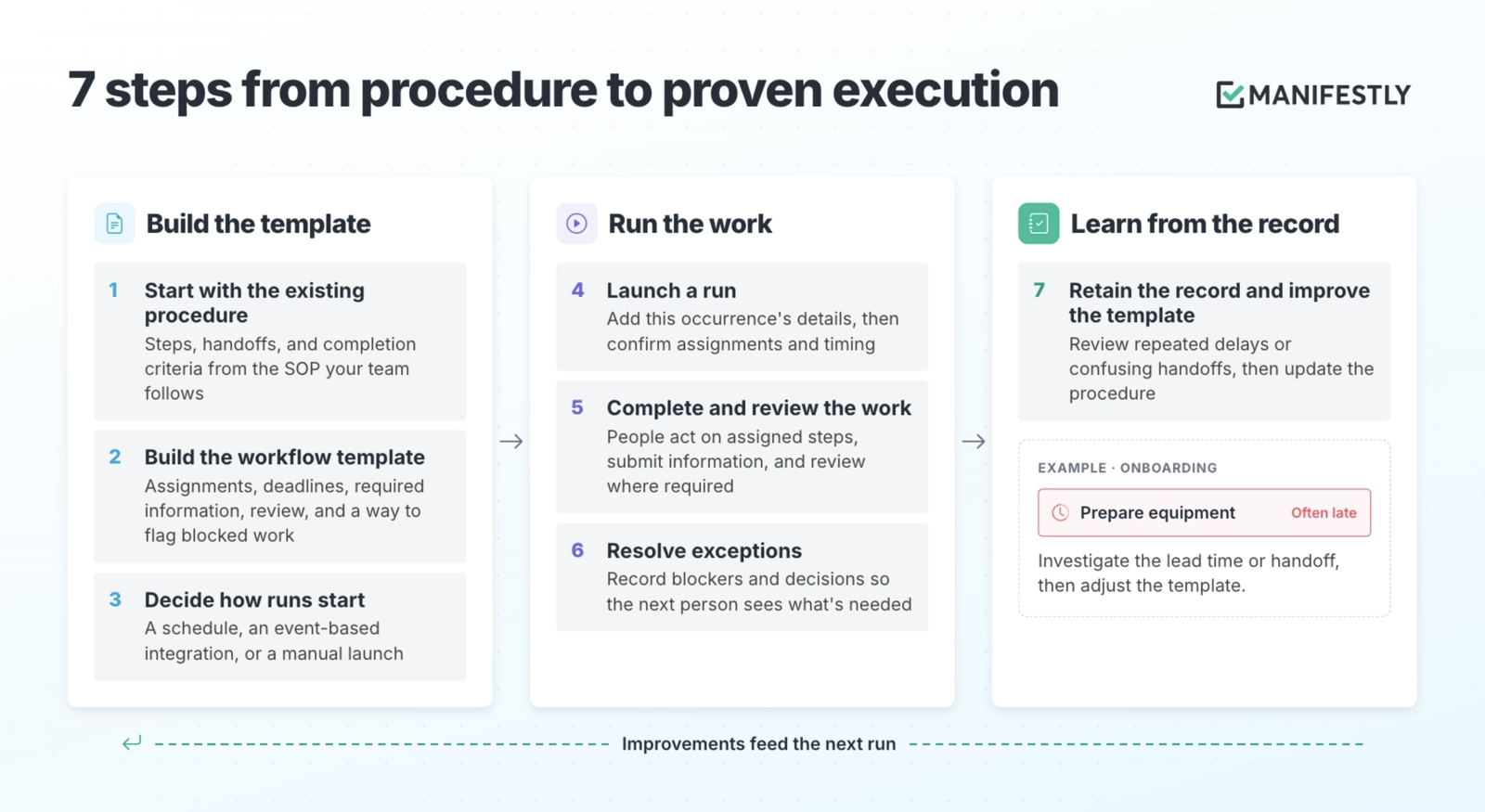
The basic sequence is to turn the SOP into a reusable template, launch a run when needed, and use the record to understand and improve execution.
- Start with the existing procedure. Identify its steps, instructions, handoffs, and criteria for completion. Use the SOP your team already follows as the starting point.
- Build the workflow template. Organize assignments, deadlines, required information, and review. Include a way to report work that cannot proceed.
- Decide how runs start. Choose a schedule, an event-based integration, or a manual launch, depending on the procedure.
- Launch a run. Add the details for this occurrence, such as the employee and start date, then confirm the assignments and timing.
- Complete and review the work. People act on their assigned steps, submit information, and review work where the procedure requires it.
- Resolve exceptions. Record blockers and decisions so the next person can see what needs to happen.
- Retain the record and improve the template. Review repeated delays or confusing handoffs and update the procedure for future runs.
For onboarding, this means the team can review one employee's readiness without reconstructing the work from email. It also creates a way to spot a recurring problem: if equipment preparation is late across several runs, the team can investigate the lead time or handoff.
What happens when a step cannot be completed?
Exceptions are part of recurring work. A reliable procedure needs a way to handle them.
Suppose the new hire's laptop is delayed. IT records the blocker, the person coordinating onboarding sees it, and the manager decides whether a temporary device is acceptable. The decision and revised plan belong with that employee's run, where the people involved can find them.
That behavior needs to be designed. Decide how blockers are reported, who receives them, who can authorize a change, and what information must be recorded. Then check how the software supports those decisions.
A status marked “overdue” tells you something needs attention. The procedure should also make clear who is responsible for responding.
Does a completion record prove the work was done correctly?
A completion record helps establish what was recorded, by whom, and when. Its strength depends on the evidence collected and the review performed.
For an equipment step, there are several levels of assurance:
- Marked complete: IT records that the laptop is ready.
- Evidence submitted: The run includes the asset number and preparation details.
- Verified: A designated reviewer checks the submitted information against the procedure's requirements.
Each level answers a different question. Decide what the work requires, then configure the steps accordingly. A routine internal task may need a completion timestamp. A sensitive access change may need authorization, supporting evidence, and review.
Software provides a place to collect and retain that information. The team defines what counts as acceptable completion.
Who needs SOP execution software?
SOP execution software is useful when the same procedure happens repeatedly and coordinating or establishing completion takes more effort than it should.
Teams that must demonstrate execution
For some teams, records of execution are part of regulatory requirements or audit evidence. Written instructions establish the standard; records help show how it was applied.
- Pharmaceutical manufacturers subject to FDA drug manufacturing requirements. Under 21 CFR 211.100(b), production and process control procedures must be followed and documented when performed. Deviations must also be recorded and justified. RAPS's summary of FDA inspection findings for 2014 lists failures to follow or document these procedures among the cited deficiencies.
- ISO 9001 certified organizations. ISO 9001 requires documented information appropriate to supporting processes and establishing that they are carried out as planned. ISO's guidance on documented information explains the role of records as evidence that planned work has actually been done. The useful question is which records demonstrate execution of your particular process.
- Companies preparing for a SOC 2 Type 2 examination. The examination addresses how controls operated over a defined reporting period. Teams need evidence of that operation, such as access review records, approvals, or completed offboarding checks. An SOP explains the intended control; records help establish whether it operated. See the AICPA's overview of SOC engagements.
These obligations do not prescribe one category of software. Evaluate whether a tool supports the evidence, access controls, retention, and review your work requires. Teams subject to 21 CFR Part 11 should confirm applicable electronic record and signature requirements with their quality team before choosing a tool.
Signs your team has outgrown documents and spreadsheets
- The same procedure runs weekly, monthly, or with every new client or hire.
- Work crosses departments, and handoffs regularly stall.
- Managers chase updates in email or chat.
- Deadlines depend on someone maintaining a spreadsheet.
- Missed steps affect customers, security, revenue, or employee readiness.
- The team reconstructs what happened after a problem occurs.
Common starting points include employee onboarding, customer onboarding, month-end close in accounting, access reviews in IT administration, property inspections, and recurring compliance checks. Choose a procedure with a recognizable coordination problem and enough repetition to see whether the new approach helps.
How does execution software fit with automation and AI?
Documentation, automation, AI, and execution software can support different parts of the same procedure. Their capabilities overlap, but the responsibilities and handoffs still need to be clear.
An integration might start an onboarding run when a new employee is added to an HR system. An AI assistant might prepare a first-week brief from the employee's role and schedule. The manager then reviews the brief before it is shared.
For that AI-assisted step, define the information the assistant can use, what it should produce, who reviews it, and what happens if the result is incomplete or wrong. Keep the relevant output and review decision with the work so the team can understand what was accepted.
Generating the brief is one step in onboarding. Its completion should connect to the next responsibility, such as the manager confirming that the plan is ready for the employee.
Human review belongs at the points the team chooses and configures. The presence of AI or workflow software alone does not establish that review will happen.
How to evaluate SOP execution software
Bring a real SOP to the demo and follow one run through to completion. Include a delay, a rejected approval, or a change in circumstances so you can see how the software handles the work your team actually encounters.
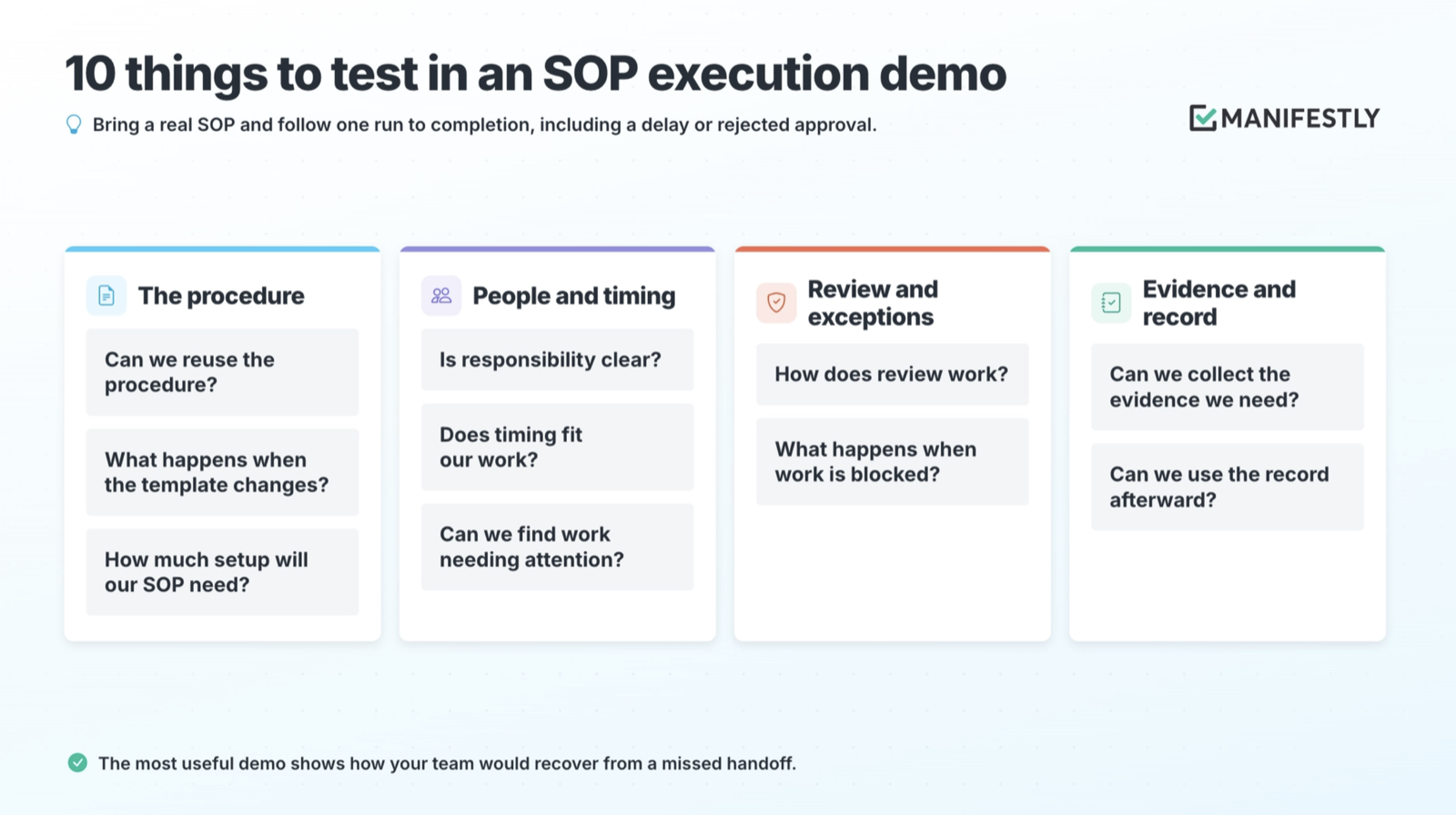
Use what you observe to judge fit. The most useful demonstration shows how your team would handle a missed handoff and recover the work.
Where Manifestly fits
Manifestly helps teams run recurring procedures through reusable workflows, role-based assignments, recurring schedules, relative due dates, reminders, data collection, and completion history. Teams can configure approvals where work needs review and coordinate recurring work through Slack or Microsoft Teams.
For an onboarding procedure, that gives HR, IT, and the manager a shared place to see their responsibilities and the employee's progress. Instructions can accompany the steps, while each run retains the information and activity for that particular employee.
Start with a procedure your team already understands but still has to chase. Define how it starts, who acts, what needs review, and how exceptions are handled. Then run it and inspect what happened.
Once the same handoff has failed several times, another reminder leaves the underlying design unchanged. The useful improvement is to make the next action, its owner, and the response to a blocker clear before the next run begins.
Start a free trial of Manifestly and put one recurring SOP into practice.
Frequently asked questions
What is the difference between an SOP and a process?
A process is the set of activities that produces an outcome, such as onboarding a client. An SOP documents a standard procedure within that work. A process may involve several procedures across different teams.
What is the difference between an SOP and a work instruction?
An SOP describes a procedure, including its purpose, responsibilities, and required steps. A work instruction gives detailed guidance for a particular task, such as configuring a device or entering information into a billing system.
Is checklist software the same as SOP execution software?
Checklist software can support SOP execution when it provides reusable templates, separate runs, assignments, timing, and records. Evaluate whether it can coordinate your procedure and handle the evidence, review, and exceptions the work requires.
Do you still need SOP documentation if you use execution software?
Yes. People still need the standard, instructions, and criteria for doing the work correctly. That guidance may live in a separate documentation system, within workflow steps, or in both places.
Is SOP execution software the same as workflow automation?
The terms overlap, and some platforms provide both. Workflow automation commonly connects systems and performs actions in response to rules or events. SOP execution software focuses on coordinating and recording each occurrence of a procedure, including work that needs people to act or review.