
Process Street vs. Manifestly: Building a Workflow Isn't Running It
August 28, 2026
Most teams do not have a documentation problem. The process is written down somewhere. There is an SOP in a shared drive, a checklist in a doc, or a template someone built two quarters ago. The work still slips.
It slips in familiar places. A step has no clear owner, so it waits. A handoff between two people happens by memory, and one week the memory fails. A review gets marked done, but the evidence that it happened is scattered across email and chat. By the time anyone notices, the miss has already cost something: a delayed start date, a customer who felt the gap, an audit finding that should never have surfaced.
For years, the standard advice was to write the process down more carefully. Now there is a new answer on offer, which is to let AI build the process for you. You can describe a workflow in a sentence and have a tool generate the steps, the forms, and the structure in seconds. That is genuinely useful, and it is a real improvement over a blank page.
But it raises the question: If AI can now build a workflow instantly, and increasingly help run it too, does that finally fix the problem of recurring work breaking down? The honest answer is that building was never the hard part, and neither was connecting an assistant. Running the work reliably is. Once you accept that, the choice between Process Street and Manifestly stops being about AI and becomes about something more basic: how you start, how the work stays accountable, and what it costs to keep going.
Building a workflow has become easy. That was never where work broke.
Both Process Street and Manifestly can turn a description into a working process. Process Street's AI workflow builder generates a workflow from a natural-language prompt. Manifestly's MCP server integration can help draft, validate, and import a new workflow template through conversation. Either way, the starting structure arrives fast.
That speed is worth having. It is not, by itself, the thing that keeps recurring work on track. And it is worth saying plainly up front, because it matters later in this comparison: AI can now help run the work too, not only build it. Both of these products let an assistant operate a live workflow. That capability, once you have it on both sides, tells you nothing about which tool to choose.
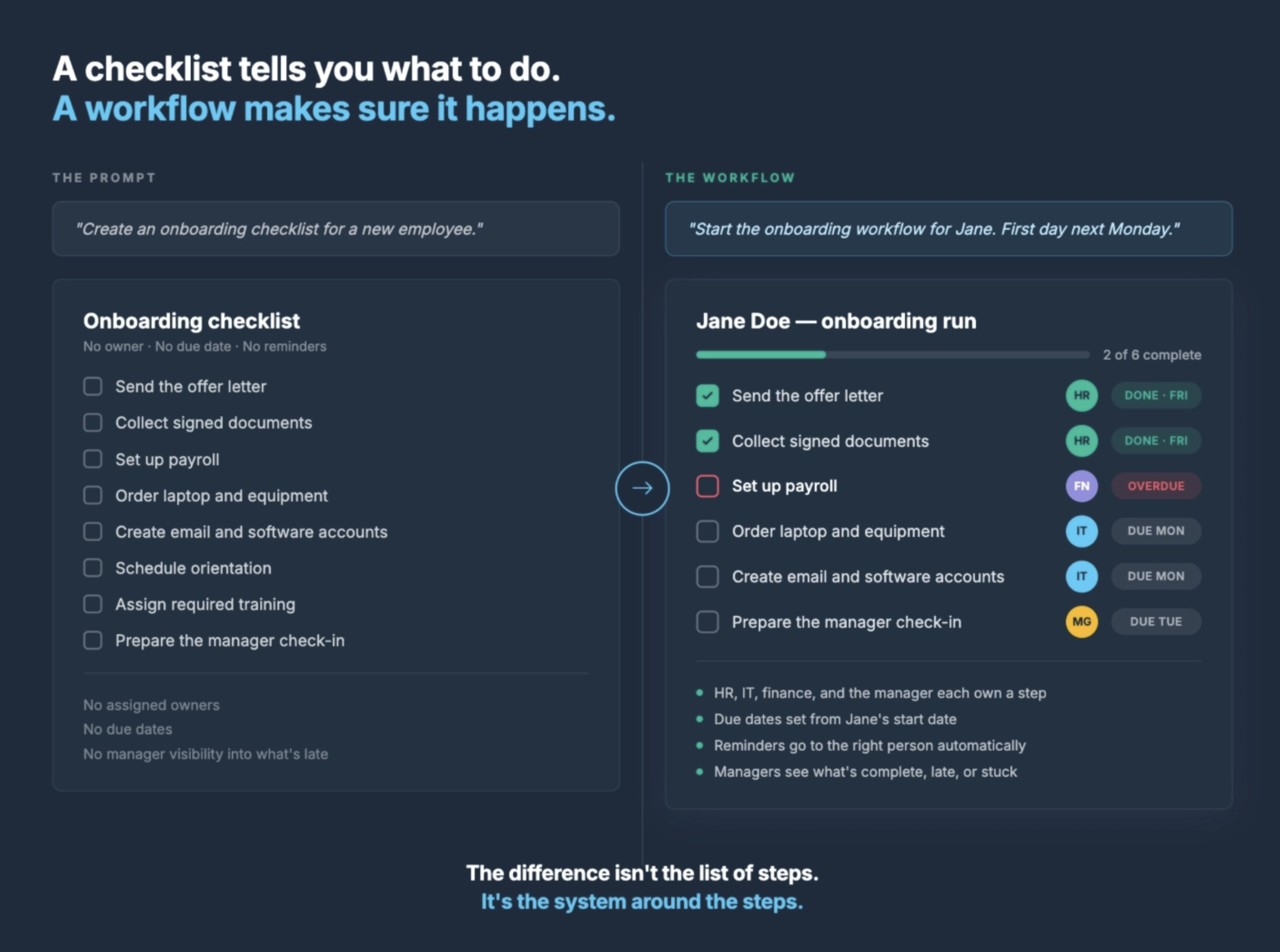
Describing work answers one question: what should happen. Running work answers a different set of questions that show up every single time the process repeats. Who owns each step? When is it due? What is late right now? Where is the handoff stuck? What evidence was collected, and what happened the last time this same process ran?
A generated checklist does not answer those questions. A running workflow does. This is the distinction we’ve written about before in a prompt is not a workflow: the prompt describes the work, but the workflow is what assigns it, times it, and keeps a record of what actually happened.
Where recurring work actually breaks
The failure mode in recurring operations is rarely a missing document. It is unclear ownership and untracked handoffs.
Think about how a status meeting usually goes. A manager asks what is done, someone answers partially, another person adds a correction, and the group slowly reconstructs a picture of work that a good system should have shown them before anyone sat down. The meeting becomes the dashboard because the process underneath does not make status visible on its own.
That is not a discipline problem to be solved with reminders to try harder. It is a design problem. Reliable recurring work depends on structure that the process itself enforces: every step has an assigned owner, every step has a due date, the right person gets a reminder at the right time, and completion leaves behind a clear record. When those things live in the workflow, follow-up stops depending on who happens to remember.
There is a ladder here that is easy to miss. Inviting someone to a workflow is not the same as assigning them a step. Assigning a step is not the same as the work being owned through to completion. A tool can make it easy to invite a whole team and still leave every step unowned. What closes the gap is assignment with a named owner and due dates the team can actually see, not a longer roster of participants. We go deeper on this in AI-assisted operations need accountability.
This is also the part that no amount of AI changes. An assistant can start the run and fill in the fields, but the accountability has to live in the workflow underneath it. That is the fact that decides which questions still matter once both tools connect to AI equally well.
On the work itself, these tools match
It is worth being honest about how much overlap there is, because it changes what you should actually be comparing.
On the core of running recurring work, Manifestly and Process Street are at parity. Both do recurring and scheduled workflows, role-based task assignments, relative due dates that move with a trigger, conditional logic, multi-step approvals, data collection and forms, audit-ready run history, and dashboards and reporting. Both generate a workflow from a prompt. Both shipped an open MCP server, so both now let you bring the AI assistant your team already uses and operate workflows through it, scoped to your existing permissions. Both carry SOC 2 Type II, SAML SSO, and SCIM provisioning at the enterprise tier, and both connect through Zapier and a REST API with webhooks. If you were hoping a feature grid would declare a winner on capability, it will not, because on capability these tools genuinely match.
So the comparison that matters is the short list of things that actually differ.
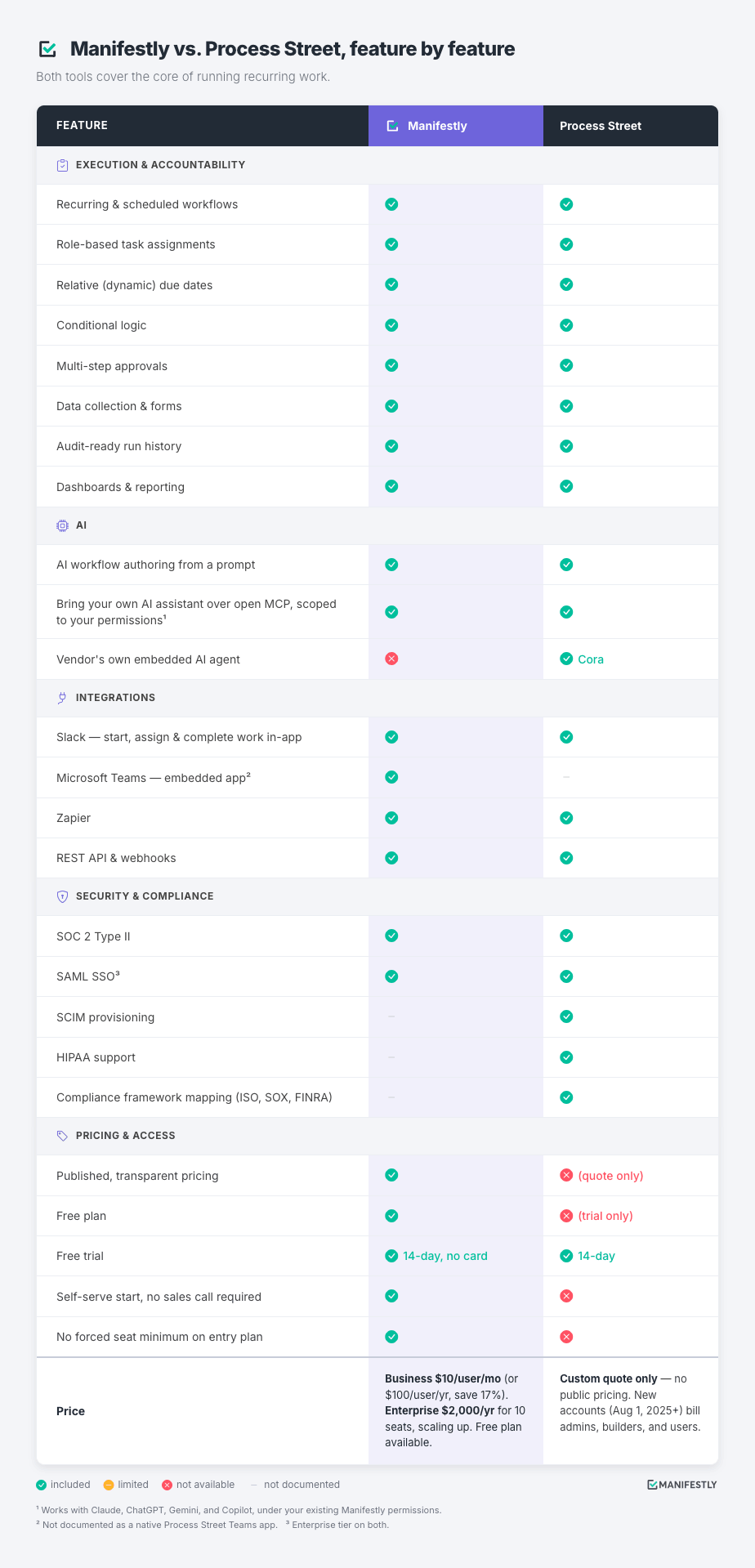
✓ included · ✗ not available · — not documented
Read plainly, that grid tells the whole story. Process Street leads on built-in enterprise and compliance governance, and those are real strengths. Cora’s always-on monitoring and framework mapping to ISO 9001, SOX, and FINRA genuinely fit a regulated, audit-heavy program, and if that is your primary problem, Process Street is a capable and reasonable choice. Manifestly leads on access and transparency, and that fits a growing operations team that needs ownership, visibility, and proof without a heavy implementation. Both grids of green checkmarks are equal. What separates the tools is everything the checkmarks do not show: how you get in, and what it costs to stay.
The difference is how you buy
At feature parity, the thing that actually differs in a buyer’s experience is not what the tool can do. It is how you get to use it. Here the two products separate cleanly, and the separation is easy to verify for yourself.
Manifestly publishes its pricing. You can read the per-user rate on the pricing page before you talk to anyone, start a free 14-day trial with no card, and keep running on a free plan after the trial if that fits your team. The whole path from curiosity to a running process is self-serve. You can try a real workflow this week and know exactly what it would cost to keep it.
Process Street no longer publishes pricing. Its pricing page routes to a sales conversation, plans are custom quoted, and only a 14-day trial is exposed. To find out what you would pay, you request a quote, and there is no free plan waiting when the trial clock runs out.
Neither of those is a small thing when you are the person trying to fix a broken process. When two tools run the work equally well, the cost of finding out becomes the real cost. One path lets a growing operations team run something by Friday and see the price today. The other asks them to book a demo and wait on a quote to learn what it costs. For a team that wants to start now rather than procure by next quarter, that is not a minor convenience. It is the deciding factor.
It is worth seeing what self-serve actually looks like end to end. You can sketch the workflow with an AI assistant on its own, describing the steps, owners, and timing in plain language until the structure is right. Then a free Manifestly signup, no card and no sales call, lets you import that structure and start a live run in the same sitting. Manifestly’s MCP server connects your assistant to your account, so from there you can start the run, assign steps, and ask what is overdue without leaving the conversation. If setup is the concern, connecting Claude takes about a minute, and we walk through it in how to connect Claude to Manifestly using MCP. The gate between building something and running it for real is a free signup you clear yourself, not a demo you schedule and a quote you wait for.
That transparency is not only about cost. For an operations team whose whole reason to adopt a tool is visibility and no hidden status, being able to see the price, the plan, and the path before committing is the same promise the product itself is making. It is worth choosing a tool that keeps that promise about its own pricing.
For the full feature-by-feature and plan comparison, we keep a detailed side-by-side on the Process Street alternative page.
Start with one process
The best way to see the difference is not to read another comparison table. It is to run one real process.
Pick a recurring workflow your team still manages by memory and manual follow-up. Onboarding, a weekly operations review, a compliance checklist, or a client handoff all work well. Build it as a workflow in Manifestly, connect your AI assistant through MCP, and then ask what is overdue, start a run from the template, and check where the work is stuck. Open Manifestly afterward and confirm the run is assigned, visible, and tracked.
You can do that today, for free, without a card and without a call. That is the whole argument in one exercise. AI makes the work easier to start and inspect. Manifestly keeps it accountable, and lets you find out what that costs before you commit.
Frequently Asked Questions
Does Process Street have an MCP server too?
Yes. Process Street shipped a Model Context Protocol server in late 2025, so both Process Street and Manifestly now let you connect the AI assistant your team already uses and operate workflows through it, under your existing permissions. That part is no longer a difference between the two tools. The differences that remain are Process Street’s vendor-run embedded agent on one side, and Manifestly’s published pricing, free plan, and self-serve access on the other.
Does AI replace the workflow in Manifestly?
No. An AI assistant such as Claude gives your team a conversational way to start, inspect, and update work, but Manifestly remains the system of record. Ownership, due dates, reminders, permissions, comments, data collection, and completion history all stay in the workflow.
Is Manifestly's AI the same as Process Street's Cora?
Not quite, and it helps to separate two things. Both tools offer an open MCP server that connects your own assistant to your account. Cora is something different and additional on the Process Street side: an embedded agent Process Street runs inside its own platform to monitor runs and produce compliance records. Manifestly does not run an equivalent embedded agent. It connects the assistant you already use and keeps the accountability in the workflow.
What can my AI assistant actually do in Manifestly?
Once connected through MCP, it can show overdue runs and assignments, start a workflow run from a template, check status, assign steps, set due dates, fill in data-collection fields, add comments, and browse your workflows, runs, departments, and users. It can also help draft, validate, and import new workflow templates.
Is Process Street or Manifestly better for compliance?
Process Street is built as a compliance operations platform with framework mapping and a vendor-run monitoring agent, which suits regulated, audit-heavy programs. Manifestly gives teams assigned, trackable, audit-ready workflows without a heavy enterprise implementation, which suits growing operations teams that need ownership, visibility, and proof.
How much does each tool cost?
Manifestly publishes flat per-user pricing on its pricing page and offers a free plan plus a free 14-day trial with no card required. Process Street no longer publishes pricing publicly and quotes plans through sales, with only a trial exposed.