
Latest features
Bulk workflow actions for archive and tagging
Bulk workflow actions for archive and tagging
Released September 2, 2025
Select multiple workflows and apply bulk Archive or Tag actions in one
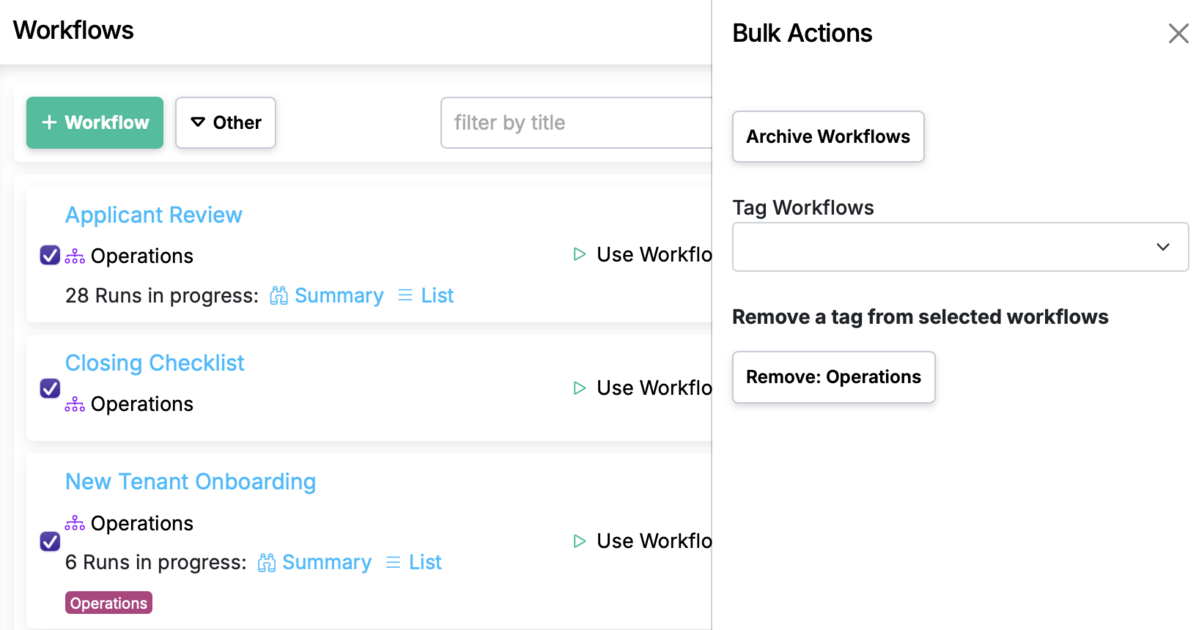
Speed up housekeeping by selecting several workflows and archiving them or applying/removing tags at once.
How to use
- Go to Workflows.
- Filter by a department. Select one or more workflows (or use Select all on the page).
- Click → choose Archive or Tag.
-
For Tag:
- Add tags or remove existing ones with one click.
-
For Archive:
- Confirm to move selected workflows to the archive.
Notes
- Archived workflows are hidden from normal use but retained for history and compliance and can by unarchived.
- Tags help organize by team, status, or function (e.g.,
Legacy,Finance,Draft).
Tips
- You first need to filter by department in order to see this feature.
- Standardize tag names to keep searches and dashboards clean.
Bulk workflow actions for archive and tagging is live in every account
Open Manifestly to try it, or book a walkthrough with our team.